+1 and +2 Computer Science

Previous Question paper answered , and Questions from Textbook

+1 and +2 Computer Application

Previous Question paper answered , and Questions from Textbook

Diploma in Computer Application (DCA)

Previous Question paper answered , and Questions from Textbook.

Master of Computer Applications (MCA)

Previous Question paper answered , and Questions from Textbook

True IQ Computer Online Academy

Contact : +91 9036433020 , mail2trueiq@gmail.com

Pageviews

Showing posts with label DCA. Show all posts

Wednesday, 20 October 2021

DCA VIDEOS - Complete


Chapter 1 

Chapter Name : Introduction to IT
Video Part : 1


Chapter 1 
Chapter Name : Introduction to IT
Video Part : 2


Chapter 1 
Chapter Name : Introduction to IT
Video Part : 3


Chapter 1 
Chapter Name : Introduction to IT
Video Part : 4


===========================================

Chapter 2 

Chapter Name : Computer organization
Video Part : 1


Chapter 2 
Chapter Name : Computer organization
Video Part : 2


Chapter 2 
Chapter Name : Computer organization
Video Part : 3


Chapter 2 
Chapter Name : Computer organization
Video Part : 4


===========================================

Chapter 3 

Chapter Name : Computer Memory
Video Part : 1


Chapter 3 
Chapter Name : Computer Memory
Video Part : 2


Chapter 3 
Chapter Name : Computer Memory
Video Part : 3


Chapter 3 
Chapter Name : Computer Memory
Video Part : 4


===========================================

Chapter 4 

Chapter Name : 
Video Part : 1

Thursday, 9 September 2021

DCA Recorded Class

 Hai Everyone,


DCA Recorded Class available here.

Plus one ,plus two computer science and computer application (kerala state syl) online tuition  and recorded class available.

*Conditions apply.

If you need any enquiry pls contact

 mail id: mail2trueiq@gmail.com


Tuesday, 1 June 2021

DCA :PAPER- 5 MALAYALAM COMPUTING


                                               MALAYALAM COMPUTING


1. Write four Unicode of Malayalam Fonts

    Ans. Meera, Rachana, Suruma, Raghu

2. --------------- is the practice of converting a text from one text to another in a systematic way.

 Ans. Transliteration

3.What is called ILeap

   ILeap is a multilingual word processor  for windows with all the features like inserting images and clip art  graphics. ILeap supports all Indian languages. ILeap  shows an  on  keyboard to help the user in easily typing in other languages besides English.

4. What is called Malayalam Computing?

      Swathanthra Malayalam Computing (SMC) is a free software community and non profit charitable society working on Malayalam and other Indic languages. It is the biggest language computing developer community in India.  They have created several Malayalam fonts.

5. What are the aims of the Malayalam Computing Projects?

      Malayalam Computing aims at strengthening malayalam language ,making use of ICT.It tries to create a Malyalam web portal for every Panchayath in Kerala which would include details such as local,natural,human resources,local economy,local industry and services.Govt. will facilitate with the development of these portals by providing server space and technical support.

6. Give the importance of free software in the language computing.

            Free software gives users the freedom to study how the program works by accessing the source code, writing additional code, testing, modifying and distributing it. These things are prohibited for proprietary software.

7. Compare UNICODE with ASCII code.

        The UNICODE is the Universal character encoding standard used for representation of text for computer processing. It is fully compatible with the international standard ISO/IEC. Unicode provides a consistent way of encoding multilingual plain text. It is destined to replace ASCII and other single and multi-byte characters sets which are limited in size and are multilingual environment.

8. Give details of any three types of Malayalam Fonts.


9.Write the steps to install Malayalam fonts in Windows and Linux.


Step I: Download Font from Malayalam Font Page (Look at Main Menu).

Step II: After download the zip file -> Extract it -> Now you will found .ttf file

Step III: Now go to Start -> Control Panel -> Fonts -> Paste the font file

Step IV: You done all thing now go to MS word select font from drop down and type in Malayalam font.

Click Here to download Malayalam Font . For learning Malayalam typing & English to Malayalam translation use our other tools.


Monday, 15 February 2021

DCA: PAPER -4 PC TECHNIQUES - Previous Year (2017-June) Solved Questions


                                                                  PAPER -4 

                                                      PC TECHNIQUES

                                    Previous Year(June 2017) Solved Questions


                                                                   SECTION-1                                              (6*1=6 )  


1. Expansion of BIOS.

 Ans. Basic Input /Output System

 2. Expansion of HTTP is 

Ans. Hypertext Transfer Protocol

3. A -------------- is common pathway through which information flows from one computer component to another.

Ans. bus

4. ---------------- is a computer expansion slot.

 Ans. Network card

5. Expansion of USB is

Ans. Universal Serial Bus

6. Inter connection of computer network  is called ------------

 Ans. Internet


                                                                     SECTION -II                           (8*2=16)

7. Define bootstrap.

   Ans. Bootstrap is the most popular cascading style sheets framework for developing websites.

8. List different expansion slots used in the motherboard.

   1. Industry Standard Architecture(ISA) - Slowest type of bus.

   2. Personal Computer Interface(PCI) - Faster than ISA, supports  plug and play.

   3. Accelerated Graphics Plot (AGP) - Designed for video adapters.

9. How  to create a startup disk.

10. Define application software.

     Application software makes the computer useful for specific application for the user. For example banking, hospital management, reservation etc.

 11. Define operating system.

      An operating system  is a program that acts as an interface between the user and computer hardware and controls the execution of all kinds of programs.

12. Define protocol.

      A protocol is a standard set of rules for formatting and processing data. Protocol enable computers with  communicate each other.

13. Note on internet.

       The internet is the global system of interconnected computer network thatuses the internet protocol suits(TCP) to communicate between networks and devices.

14. Note on driver software.


                                                                    SECTION - III                                       (6*3=18)

 15. List back panel connectors.


16. Note on different types of RAM?

     There are two types of RAM. Static and Dynamic RAM.

SRAM has lower access time. Dynamic RAM has higher access time.

SRAM is costlier than DRAM.SRAM has low packaging density.

17. Explain about control panel?


18. Use of firewall.

        Firewall is a system of computer hardware and software that provides security to the computers in an organization. It controls the incoming and outgoing network traffic and deny malicious data from entering in to the computer.

19. Note on cookies.

     Cookies are small text files created when we browse a website. It may remember our username, password etc..so hackers can use them for their malicious purpose. They use cookies as spyware to keep track our activities in system. So cookies should be frequently removed.

20. Briefly explain dial-up modem.

         Dial-up connections require users to link their phone line to a computer in order to access the Internet. This particular type of connection—also referred to as analog—does not permit users to make or receive phone calls through their home phone service while using the Internet.

21. Short note on floppy disk drive.

         Floppy disk drive is a secondary storage device. It is made up of plastic coated with magnetic material. Its capacity is 1.44 MB. A floppy drive is used to read the data from a floppy disk. Data will lose when it kept inside a magnetic field or other chemicals, because it coated with magnetic substances.


                                                                          SECTION IV                               (2*5=10)

                                                                     (Ref the textbook)

22. List and explain any 4  motherboard parts.

23. Explain different computer network.

24. Note on Repeater, Bridge and Switch.

Monday, 1 February 2021

DCA: PAPER -2 MS OFFICE & INTERNET - Previous Year (2017-June) Solved Questions


                                                                 PAPER -2 

                                                 MS OFFICE & INTERNET

                                    Previous Year(June 2017) Solved Questions


                                                                   SECTION-1                                     6*1=6                         


1. The expansion of HTML is -------------

   Ans. Hyper Text Markup Language

2. ---------- command is used for creating a new directory in MS DOS.

 Ans. MKDIR/MD

3. ------ is an example of web browser.

  Ans. Google chrome

4. The short cut used for selecting all the text in MS Word is --------------

  Ans. Ctrl+A

5. The intersection of rows and columns create boxes are called --------------

   Ans. Cells

6. An example of RDBMS is --------------

  Ans. MYSQL

                                                           SECTION - 2                                            8*2= 16


7. How to select multiple adjacent files or folders in windows  based computer system?

8. Write down the steps to move one or more files or folders to from one place to another?

9. What is alignment ?Name the four types of alignments?

10. List out any two mathematical functions available in MS Excel and their meaning?

11. Explain how to change the font type and font color in MS Word?

12. What is a power point presentation?

13. What is a website?

14. What is a search engine? Give example

                                                       SECTION - 3                                   6*3= 18

15. What is an Email? How to create an Email?

16. How to insert a table in an MS Word document?

17. Explain the use of sum function in MS Excel with an example?

18. What is a DBMS? List the advantages of DBMS

19. Explain how to add a worksheet in MS Excel workbook and how to rename it?

20.Explain how to insert a word art and clipart in MSWord?

21. List the advantages of power point presentation?


                                                        SECTION - IV                                   2*5 =10


22.  What is mail merging? Explain the mail merging in  MS Word with suitable example?

23. Explain how to draw a column graph in MS excel with example?

24. With the help of table define terms primary key and foreign key?


Sunday, 10 January 2021

DCA : UNIT-2 :COMPUTER HARDWARE AND OPERATING SYSTEM (Chapter-5 Maintaining of Computer System)


                                                                                    UNIT -2

                                               COMPUTER HARDWARE AND OPERATING SYSTEM

                                                                                 CHAPTER-5

                                                  MAINTAINING OF COMPUTER  SYSTEM


1. What do you mean by term 'Burning' ?

    Copying files to writable disc.

2. What is CD-R?

     CD-R stands for " Compact Disc Recordable ".  CD-R discs are blank CDs that can record data written by a CD burner. The word recordable is used because CD- Rs are often used to record audio, which can played back  by most CD players.

3. What is DVD +RW ?

     It stands for "Digital Versatile Disk Rewritable ". A DVD+RW is like DVD+R but can be erased and rewritten. DVD+RWs must be completely erased in order for new data to be erased.

4. What is cookie?

     Small text files that websites put on your computer to store information about you and your preferences or profile information.

5. What do you mean by back up of data?

    back up is the process of copying and archiving of computer data. Back up helps to resore the original data in case of data loss.

6. How data can be transferred from computer to flash drives?

   First of all, insert USB drive into any available USB port on your computer.

   Locate the file or folder on your computer that you would like to copy to the flash drive.

  Right - click the file.

  Select the  option "send to"

 Select "Removable Disk"

7. Why do we install antivirus in our computers ?

    Step 1 : Double click on AVG "setup" file. Waiting for sometime. One window will appear.

    Step 2 : Click " next" .

    Step 3 : Click "Accept". A window will come up.

    Step 4 : Click 'Accept' again. A window  will come up.

   Step 5 : Tick  " Standard Installation" and click " next". 

   Step 6 : Click "next". A window will appear.

   Step 7 : Click "next".

   Step 8 : Click ' Finish'. Wait for some time, A window will appear.

  Step 9 : Click "OK". Your installation is  completed.

   Step 10: Click " Next". Following window will appear 

   Step 11: Click '" Next".

  Step 12: Click "Next".

 Step 13 : Click "Next" button repeatedly. 

installation completed.

8. Why do we clean temporary internet files from our computer?

   Temporary Internet Files is that they take up a lot of hard drive space and can slow down your computer. Also they are a potential privacy threat. That is why it is recommended to delete Temporary internet Files every once in a while.

9. What is the use of system information facility in windows?

     System information shows details about your computer's hardware configuration, computer components, and software , including drivers.

10. List various system tools ?

     Disk Cleanup : It removes temporary files, empties the Recycle bin and removes variety of  a system files and other items that you no longer need.

   Defragmentation : Process of keeping scattered data in continuous memory locations.

11. What is disk defragmentation?

         Defragmentation, also known as “defrag” or “defragging”, is the process of reorganizing the data stored on the hard drive so that related pieces of data are put back together, all lined up in a continuous fashion.


                                                  Defragmented disk               Fragmented disk


                                                Essay type questions (ref text book)


12. List and explain any  two system tools in detail.

13. List and explain any three guidelines for computer maintenance.

14. Explain the burning process. Explain how CD/DVD can be burned using nero8.

15. What is the use of backing up of data? How it be done in windows7 operating system?


Wednesday, 6 January 2021

DCA : UNIT-2 :COMPUTER HARDWARE AND OPERATING SYSTEM (Chapter-4 Installing And Managing Windows 7)


                                                                               UNIT -2

                                                COMPUTER HARDWARE AND OPERATING SYSTEM

                                                                            CHAPTER-4

                                                 INSTALLING AND MANAGING WINDOWS 7


1. Pick the odd one out.

 a. Fdisk

b. G parted

c. format

d. Partition magic

 Ans. c

2. What is partitioning?

      The process of dividing a hard disk (or any other physical disk) into one or more region is called partitioning. A partition is a portion of a physical disk that functions as a separate physical disk called drive.( eg. C drive, D drive etc) .There are two types of partitioning. -primary and extended partition.

3. Explain various steps involving in installing windows 7.

  1. Switch on your computer and insert the bootable Window 7 DVD or bootable USB pen drive.

  2, Press any key 

3. Click "install now"  

4. Click next button A window will appear.

5. When tick the "I accept the license check box" and click "next" button ,A window will appear.

6. Click "Custom advanced "

7. Click "drive option advanced" when clicking it ,A window will appear.

8. Click "new". Here we are creating a new partition. After clicking a window will appear.

9. Give size of the first partition and click and "apply"

10. Click "OK". At that instances, A window will appear.

11. Click "next". A window will  be appeared. 

12. Wait until installation is completed.

13. Give the product key obtained from licensed vendor or tick "automatically activate and click next.

14. Give password .Click "next".

15. Give time and date correctly. Click "next". Installation will be completed. Now we are ready to use window 7.

4. What is formatting?

   The process of arranging a partition to store files and folders is called formatting.

5. Explain firewall and how to turn on firewall setting in windows7

     A firewall is software or hardware that checks information coming from the internet or network and then either blocks it or allows it to pass through to our computer depending on our firewall settings. 

  To turn on windows firewall .following steps can be done

  1. Select "Control panel" .Then A window appears

23. Click windows firewall

3. Click "Turn windows firewall on or off". Then A window will be appeared.

4. Click "Turn on windows firewall" and press ok.

6. What are the different  types of  internet connection available ?

   1. Wireless : 

                  Wireless connections are made possible through the use of a modem, which picks up Internet signals and sends them to other devices.

2. Broadband :

       The term broadband is shorthand for broad bandwidth. Broadband Internet connections such as DSL and cable are considered high-bandwidth connections. Although many DSL connections can be considered broadband, not all broadband connections are DSL(Digital subscriber line). 

3. Dial-up:

           Dial-up connections require users to link their phone line to a computer in order to access the Internet. This particular type of connection—also referred to as analog—does not permit users to make or receive phone calls through their home phone service while using the Internet.

Data card:

            Choose this if we have a data card purchased from an Internet Service Provider (ISP)like BSNL, Idea etc.

7. What is trouble shooting?

     The process of identifying and correcting common computer problem is called trouble shooting.

8. How to search for  a  file in window?

    Click the Start button, type the file name or keywords with your keyboard, and press Enter. The search results will appear. Simply click a file or folder to open it.

Screenshot of Microsoft Windows

9. Raju wants to share a file with his friend in a networked lab. How is it possible?

    Step 1: Right click the required file, click "share with".

Step2 : We can give "read" permission or "read" and write" permission depending on the requirement.


Friday, 18 December 2020

DCA : UNIT-2 COMPUTER HARDWARE AND OPERATING SYSTEM ( Chapter-3 Windows 7 Operating System)


                                                                            UNIT-2 

                                          COMPUTER HARDWARE AND OPERATING SYSTEM

                                                                       CHAPTER-3

                                               WINDOWS 7 OPERATING SYSTEM


1.Windows 7 is a _______operating system .

Ans: Graphical User Interface.

2. Windows 7 is a proprietary software of _________.

Ans: Microsoft.

3.------------------------ stories deleted files temporarily.

   Ans. Recycle Bin

4. Basic text editing program comes with Windows 7 is -------------.

  Ans. Word pad.

 5. Software comes with Windows 7 for simple calculation is ------------.

  Ans.  Calculator

6. Explain the different component of Windows 7 interface.

     1. The desktop

     2. The taskbar

      3. The start menu

      4. My computer

       5. Recycle Bin

       6. Windows Explorer

       Briefly explain the above topics in your own sentence.


Tuesday, 15 December 2020

DCA: UNIT-2 COMPUTER HARDWARE AND OPERATING SYSTEM (Chapter-2 Disc Operating System)


                                                                     UNIT -2 

                                   COMPUTER HARDWARE AND OPERATING SYSTEM

                                                           CHAPTER- 2

                                              DISC OPERATING SYSTEM


1. MS DOS is a ------------------ operating system.

   Ans. Single user

2. Interface of MS DOS is ------------------ 

    Ans. Character user interface(CUI)

3. ----------------- command is used to display content of a file.

   Ans. TYPE.

4. ------------- command is used to create a directory.

   Ans. MKDIR/MD

5. ------------------ command is used to display a directory.

   Ans. DIR

6. -------------- command is used to display and set system time.

    Ans. TIME.

7. Explain the use of wildcard characters?

    A wildcard characters is a special symbol that stands for one or more characters. Many operating systems and applications support wildcard. In DOS, The asterisk(*) is a wild card stands for any combination of letters. The question mark(?) is a wild card characters that stands for any single character.

For example -c*.doc refers to all files that start with letter 'C' and having extension '.doc'.

F?C.txt refers to all files that starts with F, second letter may be any character and third character must be C with extension txt.

8. How can you execute MS DOS Command in Windows 7?

     We can execute DOS command in windows using cmd.exe

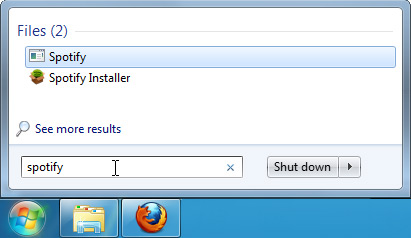
a. Click on start menu

b. type cmd.exe o  search programs and files.

c. press enter key.


Monday, 14 December 2020

DCA: UNIT - 2 COMPUTER HARDWARE AND OPERATING SYSTEM (Chapter-1 Components Of A Personal Computer)


                                                                             UNIT-2

                                    COMPUTER HARDWARE AND OPERATING SYSTEM

                                                                       CHAPTER-1

                                          COMPONENTS OF A PERSONAL COMPUTER


1. What is the normal size of the hard disk available today?

    a. 1KB

    b. 1MB

    c. 1024 bytes

    d. 1TB

Ans. d

2. The device which supplies controlled voltage to various components in CPU is ------------------

   Ans. SMPS(Switched Mode Power Supply)

3. ------------ is a PCB that is used to connect all main components together inside CPU cabinet.

  Ans. Mother Board

4. Expand USB

    Ans. Universal serial Bus

5. System date is stored using memory?

     a. RAM

    b. Secondary Memory

    c. CMOS memory

    d. ROM

Ans. c

6. BIOS means

    Ans. Basic Input Output System .The routine instructions present in ROM which is executed at the initial stage of booting are generally called BIOS.

7. What is booting?

     When we switch on the computer a series of activity take place and operating system is loaded into memory (RAM).This process is called booting.

8. Explain any three types of expansion slots?

   1. Industry Standard Architecture(ISA) - Slowest type of bus.

   2. Personal Computer Interface(PCI) - Faster than ISA, supports  plug and play.

   3. Accelerated Graphics Plot (AGP) - Designed for video adapters.


9. Explain various components present inside CPU cabinet?


Brief description about above components. Ref Text.


Tuesday, 8 December 2020

DCA: PAPER -1 INFORMATICS - Previous Year (2018 -May) Solved Questions

                                                                    PAPER -1

                                                                 INFRORMATICS

                                                    Previous Year (2018 - May) Solved Questions


                                                                   Section- 1

1. The arranged and meaningful form of data is known as -----------------

    Ans. Information.

2. One byte is -----------

  Ans. 8 bits.

3. ENIAC stands for  -------------

  Ans. Electronic Numerical Integrator and Computer.

4. The most common layout of a keyboard is ------------

  Ans. QWERTY

5. MICR stands for ----------------

    Ans. Magnetic Ink Character Recognition

6. In a ----------- operating system ,two or more users can use a computer at a time.

  Ans. Multi- user                                                                                                 (6*1=6 marks)


                                                                Section-11

7. what was the main component of third generation computer?

   a. Integrated Circuit Chips

   b. Vacuum tubes

   c. Transistors

    d. None of the above

    Ans. a

8. --------------------- is an example of output device.

  a. MICR

  b. Light pen

  c. Joystick 

   d. Monitor

Ans. d

9. Pick the odd one out

a. Windows

b. MS Office

c. UNIX

d. DOS

Ans. b

10. which one of the following is an example of secondary device?

  a. RAM

   b. ROM

  c. Hard disk

   d. register

Ans. c

11. -------------- is an example of single user operating system 

  a. Windows2012b

  b. UNIX

  c. GUI/Linux

  d. MS- Dos

  Ans. d                                                                                             (5*1=5 )


                                                             Section 111

12. What a register?

        Registers are temporary storage locations inside the CPU. The data and instruction fetched from the memory is to be stored in registers for the ongoing process.

13.  What is the function of input unit?

      1. Accept data and instruction from outside world.

     2. Convert human readable from of data to machine readable (digital) form .

      3. Supplies digital form of data to processor(CPU) for further processing.

14. Define data?

       Data is any fact connected with any object. For example, name of person(Tom),a number (it may be age, identification code or rank) etc.

15. Define computer program?

      Computer programming is a set of instructions to facilitate specific actions. Computer programmers create instructions for a computer to execute by writing and testing the code.

16. What is EEPROM's?

         Electrically Erasable Programmable ROM 

              The stored information can be altered by using electrical signal at register level rather than erasing all the information.

17. What is 4GL?

       Fourth generation of programming language(4GL). It can be used business application development. Examples of 4GL is SQL, Metafont, FOCUS etc.

18. What is an assembler?

         Assembler is a language processor ,that converts assembly language programs into            equivalent machine language programs.

19. List any four graphical input devices.

      Mouse, Joystick, Trackball, Track pad, Light pen

20. what is e-Governance?

     E-Governance is the delivery of government services and information to the public using electronic devices. For example www.kerala.gov in site act as e-governance website  Akshaya centres are promoting e-Governance.

21. Define m-Commerce?

     m-Commerce is the buying and selling of goods and services through wireless hand held devices such as cellular phone and personal digital assistants(PDA).                                    

                                                                                                                                          (10*2=20)

                                                                   Section IV

                                                            ( Answer any 9 questions)

22. Explain the characteristics of a computer?

     Speed - Computer is very fast device. Computers work at a very high speed and are much faster than humans.

        Accuracy - Since computer is programmed so what ever input we give it gives result with accurately.

       Versatality - We can use to perform completely different type of work at the same time.

       Diligence -Computer can work can work for hours or days continously without creating any errors and any break.

     Storage capacity (Power of remembering) - Every piece of information that a user stores on a computer can be retained as long as needed.

   No intelligence - Computer is an electronic machine and it has no intelligence. A computer can not take its own decision.

    No feeling/No emotion - Computer have no feelings or emotions. They have no feelings because they are machines.

23. How data is represented inside a computer?

       All the data and instructions are internally processed and stored in the form of 0 and 1 digits. These digits are called binary digits. (bits). The computer has switches to represent data and switches have only two states: ON and OFF. In binary digit ON is 1 and OFF is 0. In other words low voltage represented by the digit 0 and high voltage represented by the digit is 1.

24. Distinguish between sequential access devices and direct access devices?

           Sequential access devices : A magnetic tape is an example. Here the storage surface is organised into units of data called blocks. Data blocks are stored one after another in sequential manner on the tape ribbon.

Direct access devices : A magnetic disk is an example.We can access  any addressed storage block directly. The computer can  access any storage location on the surface of the disc directly using Read/Write Head.

25. Distinguish between RAM and ROM?


       26. What are the advantages and limitations of high level languages?


27. Differentiate between compiler and Interpreter?

       Compiler : Compiler is a language processor ,that translates programs written in High level language    into Machine language. A compiler will take the entire source program file as input then translate it into machine language program and save it as object file.

Interpreter : An interpreter is an another type of language translator used to translate high level            language program into machine language program. It takes  one statement at a time as input ,translate it into machine code, which is immediately executed.

28. Explain different types of e- Commerce model?

       There are four traditional types of ecommerce, including B2C (Business-to-Consumer), B2B (Business-to-Business), C2C (Consumer-to-Consumer) and P2P(Peer -to Peer)

Business -to- Consumer : When commerce taking place between business and a consumer, it is called B2C. For example purchasing a book through internet.

Business -to -Business: When commerce taking place between business it is called B2B. For Example  companies doing business with each other such as manufacturers selling to distributors and wholesalers selling to retailers.

Consumer- to- Consumer : When commerce taking place between consumer and a consumer, it is called C2C.This model consists of person -to- person transaction  which enables customers to directly deal with each other.

Peer - to - Peer: This type of e-commerce when computer users share files online.

29. Write a short notes on malicious software?

        Malicious software ( Malware) includes computer viruses, worms trojan horses ,spyware, cookies and other malicious programs.

A computer virus is a program or piece of code that is loaded onto our computer without our knowledge and damage routine and normal working of our computer system. A worm is a special type of virus that can replicate itself and use memory. Trojan horse is a non-self- replicating type of malware program containing malicious code. A spyware is a software that monitors user activity on the internet and transmits that information in the background to someone else.


30. What are the application of computer in education?

          Now a days conventional classrooms of schools are totally  changed by modern smart classroom. A new category of teaching tools are emerged by using computers for learning CAVI(Computer Aided Video Instruction),Multimedia, CD ROMs, CAI, Presentation aids, internet ,distance education ,online education are some methods used by the computers in education.

    1. e- Learning: e-Learning or learning through computer technology helps the students to provide good and standardized education. Students can interact with the e-learning software, enjoy exiting colourful presentation etc.

2.  Virtual classrooms:  A virtual classroom is an online learning environment. It helps the students to get online education from  remote places. Just like a real world classroom, a student in a virtual classroom participates in synchronous instruction.

31. Briefly explain laser printer?

      Laser printers are non-impact type printers. They print one page at a time. These printers use laser beam to produce an image on a photosensitive drum. The image is  transfered  from drum to paper using toner. Toner is an electrically charged ink.
                                                                                                                                  (9*5=45)
 
                                                             Section V
                                                   ( Answer any 3 questions)

32. Explain computer generations?
 
33. Explain classification of computers according to their size and speed?

34. What is an output device? Explain any 3 output devices?

35. Distinguish between  system software and application software?
                                                                                                                              (3*8=24)


Saturday, 5 December 2020

DCA : PAPER - 1 INFORMATICS -Previous Year(2017 - June) Solved Questions.


                                                                        Paper - 1

                                                                       Informatics

                                                  Previous Year( June 2017) Solved Questions


                                                                   Section -1


1. ------------------------ introduced the concept of stored program.

  Ans.  Computer

2. USB stands for

     Ans. Universal Serial Bus.

3. -------------------- is an example for a company that manufacture microprocessor.

    Ans. Intel

4. Cache memory is placed between the processor and ---------------

    Ans. Primary memory

5. ------------ is an example of 4GL(4th Generation Programming Language).

   Ans. Database Query Language  eg. SQL

    others are Metafont,  Focus, Postscript etc

6. -------------------- is an example of volatile memory

   Ans. RAM(Random Access Memory)                                                               (6*1 =6 marks)


                                                       Section 11


7. Which of the following is an example for primary memory.

  a. RAM

  b. Optical Disk

   c. Hard disk

  d. Punched card 

   Ans. a

8. Which of the following is an example for sequential access drive.

  a. Floppy disk

 b.   Hard disk 

  c.  Zip disk

  d.  Pen drive

   Ans. all options are wrong

9. -------------------- is an example for an input device.

   a. Monitor

    b. Printer

     c. Plotter

      d. Touch Screen

Ans. d.

10. --------------- is an example for a system software.

  a. Excel

   b. GNU/Linux

   c. Microsoft office

    d. Open office

 Ans. b

11. In a single bit how many bits will be there?

   a. 8

   b. 16

    c. 4

    d. 32

  Ans. a                                                                                                  (5*1=5 marks)

                                                               Section 111

                                                           Answer all questions

12. List the features of 4th generation of computer?

      1. The fourth generation of computers have microprocessor - based system. It uses VLSI (Very                     Large Scale Integrated) circuits.

       2. Very reliable

        3. Heat generated is negligible.

         4. No air conditioner is required.

          5. Operation speed is pico seconds.

           6. Easy portable.

13. Why a microprocessor is needed in a computer?

           Microprocessor is the most important component in a computer. It is used to build a system which can perform multiple tasks. It is a programmable device that takes in input perform some arithmetic and logical operations over it and produce desired output.

14. What do you understand the term Hyper threading?

          Hyper threading is a technology used by some Intel microprocessors that allows a single microprocessor to act like two separate processors to the operating system and the application programs that use it.

15. Write about EEPROM?

      Electrically Erasable Programmable ROM 

              The stored information can be altered by using electrical signal at register level rather than erasing all the information.

16. List the different magnetic storage devices?

         Hard disks, Floppy disks,  Magnetic tape

17. Write the characteristics of a monitor?

Size.

Resolution.

Bandwidth
.
Refresh rate.

Interlaced or non – interlaced.

Dot pitch.

18. What do you understand by the term  Kernal  of an operating system?
 
           The kernel is a computer program at the core of a computer's operating system that has complete control over everything in the system.

19. Write examples of virus(any two)

   Ans. File virus ,Boot sector virus, Macro virus.

20. write about software piracy?

       When you are copying a software product without the legal permission of its creator this act is known as software piracy.

21. What is a computer?

       Computer is an electronic programmable data processing machine. It can store ,process and retrieve data as and when desired.
                                                                                                                                     (10*2= 20 marks)

                                                  Section 1V
                                             Answer any 9 questions

22. Explain the different classification of computer based on size.

              Computers can be classified by their size ,speed , storage capacity and application domain. They are
 
     Micro computers ,Mini computers ,Main frame computers and Super computers.

 (Ref text and study Brief description about all)

 23.List the different types of Micro computers.
 
    Different types of Micro computers are Desktop computers, Laptops ,Palm tops.

Desktop Computers:  The desktop computers are also known as PCs are the most common type of micro computers intended for personal and office use of an individual.

Laptops : A laptop is a portable micro computer that a user can carry around. They are small computers including all the features of a normal personal computer. The advantages are light weight and flat.

Palm tops : The palm top computers are essentially small portable computers and its weight and size are suitable to handle it on our palm.
  
24. Write the function of motherboard?

         Motherboard holds many of the crucial electronic components of the system such as CPU ,memory and provides connectors for other peripherals .It also includes sound card ,video cards network cards etc.  It can be considered as the backbone of a computer.

25. How can we differentiate two microprocessors? 
 
             Question is not correct
  
26. Write down the characteristics of Secondary Memory.

           Overcome the limitations of primary memory ,the secondary storage devices are introduced.
Secondary storage devices are low cost ,large storage capacity and data stored are permanent in nature. 
 
 27. List and explain the different types of RAM?

      SRAM and DRAM are two different types of RAM.
 
   SRAM (Static RAM) : Binary bits are stored using traditional transistor flip flop.Here the bits are represented by voltages. They are fast but costly.

DRAM(Dynamic RAM) : information is stored in the form of charges on a capacitor. Because capacitors have a natural tendency to discharge, its contents must be periodically refreshed. they are small in size ,less cost ,slow and consumes less power than SRAM. Available variations of DRAMs
Synchronous dynamic random access memory (SDRAM), Double Data Rate - SDRAM(DDRAM)
and RDRAM (Rambus Dynamic Random Access Memory)

28. Explain the different pointing devices?

            Mouse ,Optical mouse ,Trackball, Track pad ,Track point and Joystick are the different types of pointing devices.

Mouse : Mouse is the most popular pointing devices. It is a small hand held device that fits comfortably in user's palm.

Optical mouse : An optical mouse is an advanced computer pointing device that uses a light -emitting   diode(LED) and optical sensor.

Trackball : A trackball is a cursor control device used in many notebook and laptop computers. The trackball is usually located in front of the keyboard towards the user.

Track Pad : It is one of the latest pointing devices. It looks like a small ,gray window about two inches wide.

Track point : This device is also called an eraser pointer because it resembles the shape of a pencil eraser.

Joystick : It is used to move the cursor position on screen. Its function is similar to that of a mouse.
 
 29. What do you understand by language translator? List and explain different types of translators?

            The software which translate programs written in one language to another language is generally known as Language processors.

                  Assembler ,Compiler and Interpreter are types of translators.
 
Assembler : Assembler is a language processor ,that converts assembly language programs into            equivalent machine language programs.

Compiler : Compiler is a language processor ,that translates programs written in High level language    into Machine language.

Interpreter : An interpreter is an another type of language translator used to translate high level            language program into machine language program.

30. List the different freedom offered by free software?

        1. The freedom to use the program ,for any purpose and any where.

         2. The freedom to study how the program works ,and modify it as you wish.
       
          3. The freedom to redistribute copies so you can help your friends.

           4. The freedom to distribute  copies of your modified versions to others.

31. Explain the different application of IT?

     Business ,Medicine and Healthcare ,Entertainment, E- Governance ,Education, Engineering Manufacturing ,Science and IT policy.
(Ref text book and Brief study about  the topics)                                   (9*5= 45marks)

                                                                 Section v

                                                     Answer any 3 questions


32. List and explain  the different characteristics of a computer

33.  With a neat block diagram explain the organization of a computer.

34. Explain the different types of operating system.

35. List and explain the different types of E- commerce.                         (3*8 =24)               


Saturday, 28 November 2020

DCA : UNIT-1 INFORMATION TECHNOLOGY (Chapter -6 Application of Information Technology)


                                                                           UNIT -1

                                                    INFORMATION TECHNOLOGY

                                                                     CHAPTER -6

                                         APPLICATION OF INFORMATION TECHNOLOGY


1. Define m-Commerce?

      m-Commerce is the buying and selling of goods and services through wireless hand held devices such as cellular phone and personal digital assistants(PDA). 

2. What do you mean by online trading?

     Online trading is the buying and selling of stocks and shares through computer. Stock exchanges and stock broking firms are using computers for getting various information like foreign securities ,share index etc.

3. Give an example of e-Commerce website?

       www.amazon.com,www.flipkart.com,www.myntra.com etc

4. what is virtual classroom?

     A virtual classroom is an online learning environment. It helps the students to get online education from remote places. Many schools and businesses have rolled out virtual classrooms to provide synchronous distance education.

5. What is e-Governance?

    E-Governance is the delivery of government services and information to the public using electronic devices. For example www.kerala.gov in site act as e-governance website  Akshaya centres are promoting e-Governance.

6. What do you understand the term 'Telemedicine'?

      Telemedicine is used to examine patients in remote location. Telemedicine is implemented with the help of telephone line and a computer network. For example a doctor is sitting in England can consult a patient is sitting in Kerala.


                               Objective type questions and answers


1. IT stands for ------------- .

  Ans. Information Technology

2. Selling ,Purchasing of goods and services over the internet is called ----------------------- .

   Ans. e-Commerce

3. B2C stands for ---------------- .

Ans. Business- to - Consumer

4. Performance of all banking activities through internet is called -------------- .

    Ans. m-Commerce


                                        Essay type questions


1. What are the applications of computer in communication?

2. List out the IT policy in Kerala state?

3. Explain different types of e- Commerce model ? 


Tuesday, 24 November 2020

DCA : UNIT -1 INFORMATION TECHNOLOGY (Chapter -5 Computer Software)


                                                           UNIT -1

                                               INFORMATION TECHNOLOGY

                                                       CHAPTER -5

                                               COMPUTER SOFTWARE


1. Define Computer program?

        A sequence of instructions to perform a specific task, written in a programming language is called a computer program.

2. Name the three different categories of programming languages?

       Machine language, Assembly language, High level language.

3. Distinguish between System software and application software?

      System software is a set of programs ,designed to control ,manage and support a computer system an its data processing activities.

     Application software makes the computer useful for specific application for the user. For example banking, hospital management, reservation etc.

4. Give the advantages and disadvantages of machine language?

    Advantages:  Fastest execution .Direct control on hardware components. No need of a language                                    translator.

 Disadvantages: Machine dependent. Difficult to write program. Error pron. Difficult to detect error                                   and  modify. 

5. Why does an operating system become necessary for a computer system?

     It is a system software package to control and utilize all the hardware resources of a computer. An operating  system acts as an interface between computer hardware and user. Also we should  provide some software assistance to all the hardware components for their proper functioning.

6. List out the functions of an operating system 

   Processor management - The processor time slot is assigned to different tasks executed by computer.

Memory management - Allocation of main memory to various programs

Input/output management - The coordination and assignment of different input and output devices among various programs being executed.

File management - All computer systems are store, retrieve and share information. 

Such information units are called files.

Security - Provide provision to protect computer resources from unauthorized access.

Device control - All the peripheral devices are controlled and coordinated by corresponding driver modules of operating system.

7. Differentiate between Single User operating system and Multi user operating system ?

     This type of OS permits only one user to operate the computer at a time. Here the CPU connects with an output unit like a monitor and an input unit like keyboard  and mouse .

 Multi user operating system is two or more users can use a computer at a time. This architecture contains a central CPU.  A number of dumb terminals are connected to the CPU. 

8. What do you mean by the term language processors? Name the three types of language processors available?

    The software which translate programs written in one language to another language is generally known as Language processors or language translators.

Assembler Compiler and Interpreter are the three types of language processors.

9. Explain the use of an assembler

    Assembler is a language processor, that converts assembly language program into equivalent machine language program.

10. Explain the working of compiler and interpreter .How they differ?

      Compiler is a language processor ,that translates programs written in High level language into Machine language.

    Interpreter is another type of language translator used to translate high level language program into machine language program.

   Compiler will take the entire source program file as input then translate it into machine language program and save it as 'Object file' . Interpreter will take one statement at a time as input ,translate it into machine code which is immediately executed.

11. What are the  advantages and limitations of high level languages?

       Advantages : Easy to understand, program, error detection and correction. machine independent.

    Limitations : Slow execution. A language translator is needed.

12. What do you understand by Utility programs? Give examples.

     Utilities are those programs which are designed to assist day to day smooth functioning and maintenance of a computer system. Some of them are available as part of operating system and some others are available as third party software.

Examples are Antivirus software, backup utilities ,disc defragmenter , compression utilities etc.

13. Write a short note on Malicious Software?

     Malicious software ( Malware) includes computer viruses, worms trojan horses ,spyware, cookies and other malicious programs.

A computer virus is a program or piece of code that is loaded onto our computer without our knowledge and damage routine and normal working of our computer system. A worm is a special type of virus that can replicate itself and use memory. Trojan horse is a non-self- replicating type of malware program containing malicious code. A spyware is a software that monitors user activity on the internet and transmits that information in the background to someone else.

14. What is software piracy?

           When you are copying a software product without the legal permission of its creator this act is known as software piracy.

15. Discuss the different aspects of the term "Free software"?

    Free software means software that respects users freedom on software.it means that the users have the freedom to use ,copy, distribute, study, change and improve the software.

                             Objective type questions and answers

1. pick the odd one out

 a. windows

 b. MS office

 c. Unix

 d. DOS

Ans. MS office

2. A set of programs, designed to control and manage a computer system is called --------------

   Ans. System software

3. The software which translate programs written in one language to another language is known as -----------------

Ans. Language processors